Configure a Connector
Version 26.2.9686
Version 26.2.9686
Configure a Connector
This section contains all of the configurable connector properties.
Settings Tab
Connector Details
Settings that determine how the API can be accessed.
- コネクタId コネクタの静的な一意の識別子。
- コネクタの種類 コネクタ名とその機能の説明が表示されます。
- コネクタの説明 コネクタとフローにおけるロールについて自由形式の説明を記載するオプションのフィールド。
- API Endpoint The URL to which the custom API is published. To access a specific resource, append a slash and the resource name to this URL value.
- API Documentation The URL to which the documentation for the custom API is published.
Connection
Settings related to the database connection. Click Add Connection to configure a connection.
- Select Connector The type of database to connect to. The remaining connection fields vary based on your database choice. The most common fields are described below, but you should review the connector documentation for your database if you need additional information.
- Server The host name or IP address of the server hosting the database.
- Auth Scheme The type of auth scheme to use for authenticating the connection. When you select an auth scheme, additional fields appear. The connector documentation for your database contains details on these fields. Not applicable for DB2.
- Port The port on which to connect to the database host.
- Database The name of the database to connect to.
- User The user credential that has permission to access the database.
- Password The password credential associated with the specified User.
Tables Tab
The Tables tab lists all API resources exposed by the connector. Each resource is generated from a table or view present in the connected database. Adding a new table or view exposes new database data to a web API call via the connector. See API Resources for details.
Stored Procedures Tab
The Stored Procedures tab lists all API actions exposed by the connector. Each action is generated from a stored procedure present in the connected database. Adding a new stored procedure exposes new database data to a web API call via the connector. See API Actions for details.
Users Tab
The Users tab lists all users authorized to make API calls to the connector. It lets you:
- Create users with their associated authtokens and OAuth 2.0 credentials
- Define HTTP method privileges (GET, POST, PUT, MERGE, PATCH, and DELETE)
- Specify how many requests each user can make per hour
- Specify how many concurrent requests are permitted
You can add, edit, and delete users on this tab. See Users and Authentication for details on each field.
Note: The request settings here override settings in the Default Rate Limits section of the Server tab.
Server Tab
Trusted IP Addresses
次の機能は、信頼されたIP アドレスセクションで利用可能です。
- 追加 新しいIP アドレスの範囲を入力します。
- 編集 選択されたIP アドレスの範囲を編集します。
- 削除 選択されたIP アドレスの範囲をリストから削除します。
この機能には次の制約が適用されます。
localhostを編集したり、リストから削除することはできません。- 定義された範囲外のIP アドレスは拒否されます。
- 範囲指定に対応しています。例えば、エントリ
100.10.100.1-15は、100.10.100.1から100.10.100.15までのIP アドレスが許可されることを示します。 - Classless Inter-Domain Routing (CIDR) 表記に対応しています。例えば、エントリ
100.10.100.0/24は、100.10.100.0から100.10.100.255までのIP アドレスが許可されることを示します。 - ワイルドカードのパターンに対応しています。例えば、エントリ
100.10.100.*は、100.10.100で始まるIP アドレスが許可されることを示します。
Note:クライアントがサーバーに到達できるようにするには、明確なネットワークパスが必要です。クラウド環境では、次の3か所で変更を加える必要がある場合があります:
- クラウドコンソールのネットワークルール。
- アプリケーションをホストしているマシンのファイアウォールルール。例えば、Amazon AMI を使用する場合、Uncomplicated Firewall(UFW)を使って目的のポートのトラフィックを許可することができます。Linux 環境での一般的なストラテジーでは、1024 未満のポートから1024 以上の非標準ポートにトラフィックを転送し、非標準ポートを使用するようにアプリケーションを構成します。これにより、1024 未満のポートにバインドする非root ユーザーに関連する権限の問題を回避できます。
- セキュリティタブのネットワークアクセスセクション。
Default Rate Limits (Per User)
Settings restricting the number of API requests allowed.
See Rate Limiting for more information.
- Max Requests Per Hour The limit to the number of requests a single user can issue in an hour.
- Max Concurrent Requests The limit to the number of concurrent requests a user can issue.
Cross-Origin Resource Sharing (CORS)
Settings governing the use of CORS to serve cross-origin resources.
- クロスオリジンリソース共有(CORS)を有効化する CORS を有効にするかどうか。その他のオプションは、このボックスにチェックを入れた場合のみ利用可能です。
- すべてのドメインを ‘*’ なしで許可 有効にすると、ドメインオリジンは特定のリストに制限されません。
- Access-Control-Allow-Origin 許可するドメインオリジンのカンマ区切りリスト。HTTP レスポンスヘッダーとして含まれます。
- Access-Control-Allow-Credentials クロスオリジンリクエストでcookie のようなユーザークレデンシャルを許可するかどうか。HTTP レスポンスヘッダーとして含まれます。
- Access-Control-Allow-Methods 許可するメソッドのカンマ区切りリスト。HTTP レスポンスヘッダーとして含まれます。
- Access-Control-Allow-Headers 許可するヘッダーのカンマ区切りリスト。HTTP レスポンスヘッダーとして含まれます。
- Access-Control-Max-Age Access-Control レスポンスヘッダー値をキャッシュできる最大時間(秒)。
OData
Settings related to OData feature support.
- Server-Side Paging Size The number of results per-page returned by an OData request. Set this option to 0 to return all results.
- Default Format The OData format to be used when the client does not specify a format.
- Default Version The OData version to be used when the client does not specify a version.
- Date Time Format The format to use when returning date-time information.
- Base URL The fully qualified URL of the OData endpoint. If unspecified, Arc attempts to create the base URL based on the incoming request.
- Authtoken in URL Check this to allow the connector to pass the authtoken in query string parameters for authentication. See Using Auth Tokens as Query String Parameters for more information.
Advanced Tab
Message
- Sent フォルダに保存 チェックすると、コネクタで処理されたファイルをコネクタのSent フォルダにコピーします。
- Sent フォルダのスキーム 選択された時間間隔に従ってSent フォルダ内のメッセージをグループ化するようコネクタに指示します。例えば、Weekly オプションを選択すると、コネクタは毎週新しいサブフォルダを作成してその週のすべてのメッセージをそのフォルダに格納します。ブランクに設定すると、コネクタはすべてのメッセージをSent フォルダに直接保存します。多くのメッセージを処理するコネクタの場合、サブフォルダを使用するとメッセージが整理されてパフォーマンスが向上します。
Logging
- Log Level The verbosity of logs generated by the connector. When you request support, set this to Debug.
- Log Subfolder Scheme Instructs the connector to group files in the Logs folder according to the selected interval. The Weekly option (which is the default) instructs the connector to create a new subfolder each week and store all logs for the week in that folder. Leaving this setting blank tells the connector to save all logs directly in the Logs folder. For connectors that process many transactions, using subfolders helps keep logs organized and improves performance.
- Log Messages Check this to have the log entry for a processed file include a copy of the file itself. If you disable this, you might not be able to download a copy of the file from the Transactions tab.
Miscellaneous
Miscellaneous settings are for specific use cases.
- Other Settings Enables you to configure hidden connector settings in a semicolon-separated list (for example,
setting1=value1;setting2=value2). Normal connector use cases and functionality should not require the use of these settings.
アラートタブ
アラートの設定に関連する設定。
サービスレベル(SLA)を実行する前に、通知用のEメールアラートを設定する必要があります。デフォルトでは、Arcはアラートタブのグローバル設定を使用します。このコネクタに対して別の設定を使用するには、グローバル設定をオーバーライドをオンにします。
デフォルトでは、エラーアラートが有効になっています。つまり、エラーが発生するたびにE メールが送信されます。これをオフにするには、有効化チェックボックスのチェックを外します。
件名(必須)を入力してから、オプションで受信者のEメールをカンマ区切りのリストで入力します。
SLA タブ
サービスレベルアグリーメント(SLA)の設定に関連する設定。
SLA を使用すると、フロー内のコネクタが送受信すると予想される処理量を設定したり、その量が満たされると予想される時間枠を設定できます。CData Arc は、SLA が満たされていない場合にユーザーに警告するE メールを送信し、SLA を At Risk(危険) としてマークします。これは、SLA がすぐに満たされない場合に Violated(違反) としてマークされることを意味します。これにより、ユーザーはSLA が満たされていない理由を特定し、適切な措置を講じることができます。At Risk の期間内にSLA が満たされなかった場合、SLA はViolated としてマークされ、ユーザーに再度通知されます。
SLA を定義するには、予想処理量をオンにしてから、設定タブをクリックします。
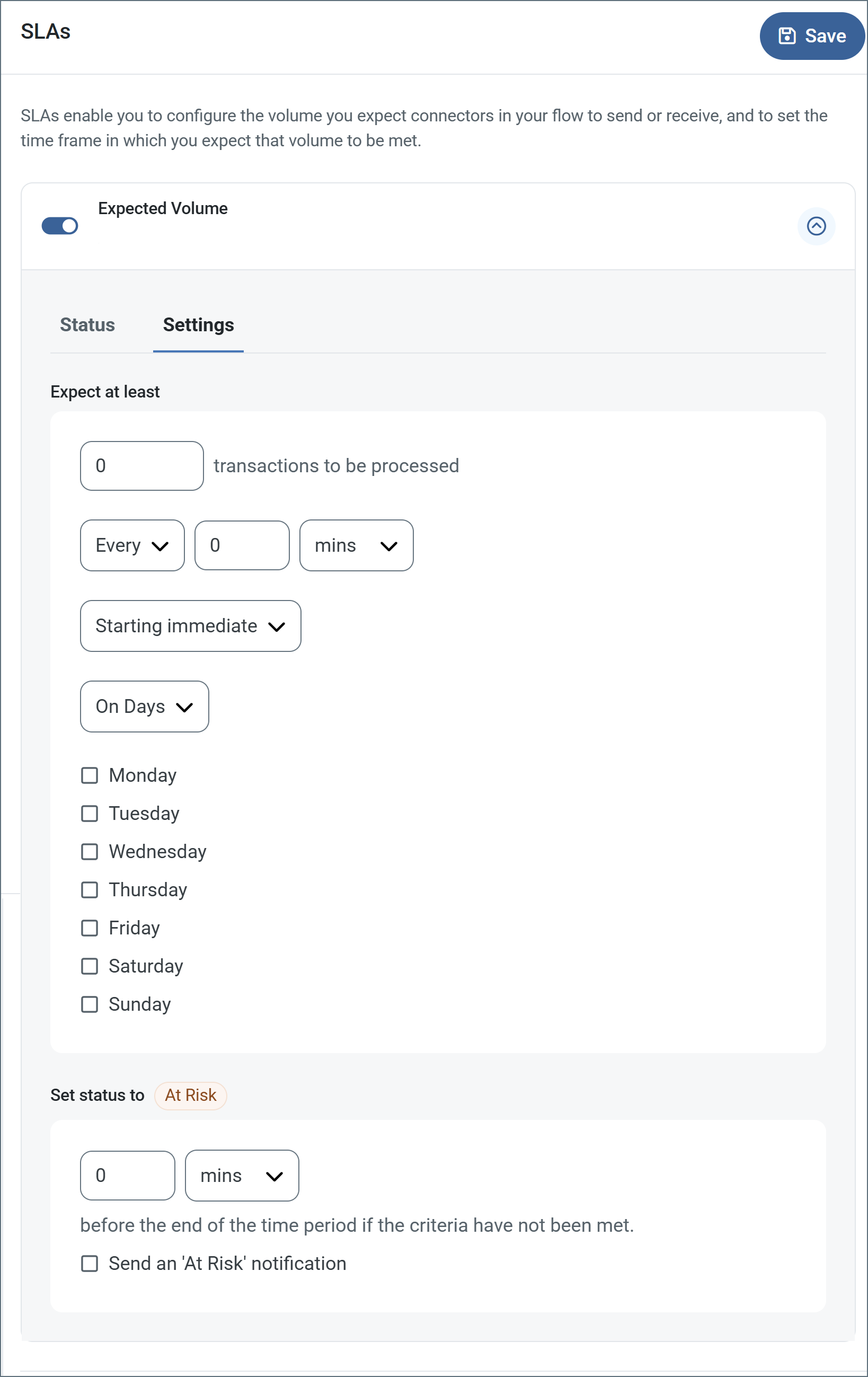
- コネクタに個別の送信アクションと受信アクションがある場合は、ラジオボタンを使用してSLA に関連する方向を指定します。
- 検知基準(最小)の部分では:
- 処理が予想されるトランザクションの最小値(量)を設定します。
- 毎フィールドを使用して期間を指定します。
- SLA が有効になるタイミングを指定します。開始日を選択した場合は、日時フィールドを入力します。
- SLA を有効にする曜日のチェックボックスをオンにします。必要に応じて、ドロップダウンから毎日を選択します。
- ステータスを’At Risk’ に設定の部分では、SLA が危険としてマークされるタイミングを指定します。
- デフォルトでは、通知はSLA が違反のステータスになるまで送信されません。これを変更するには、‘At Risk’ 通知を送信のチェックをオンにします。
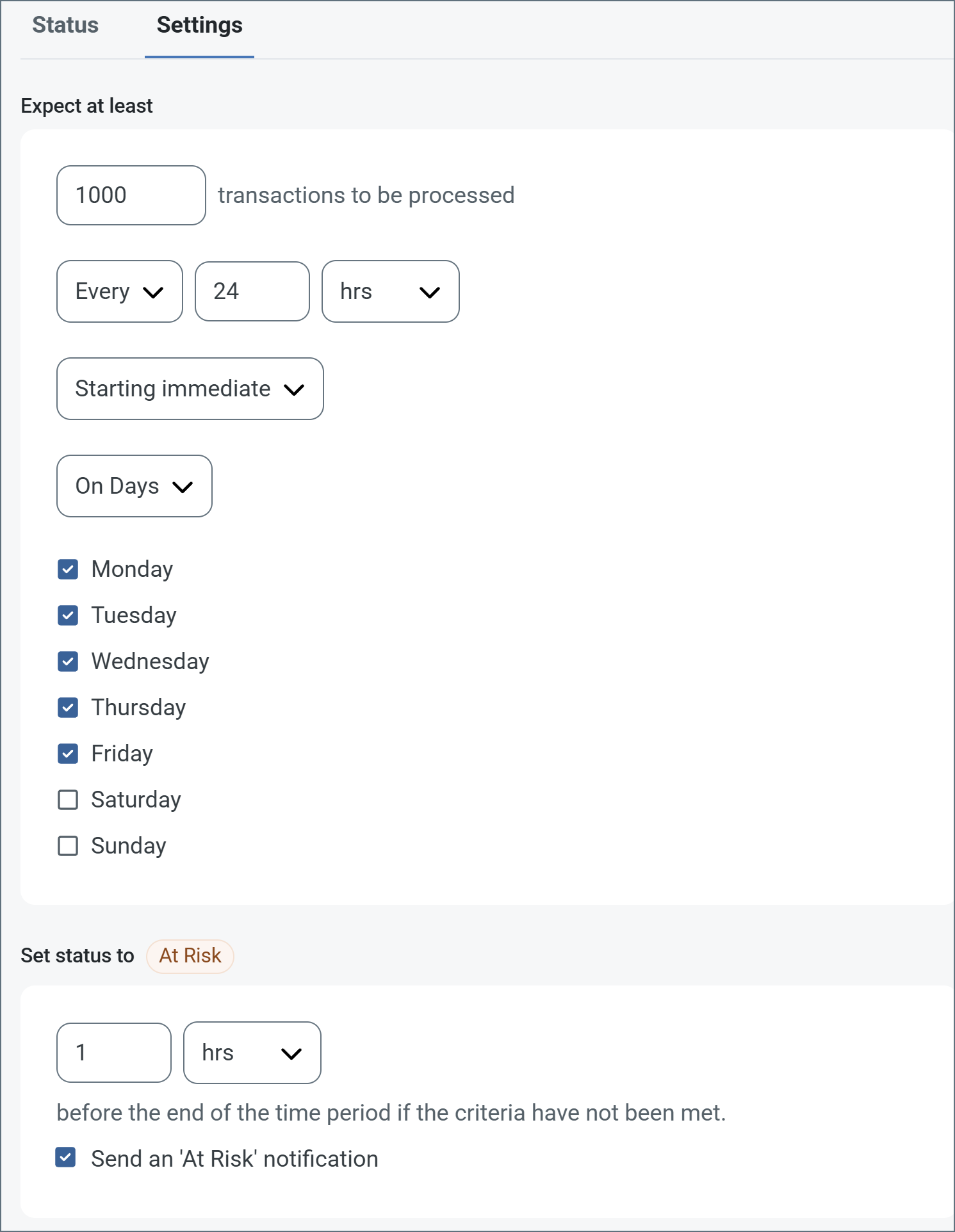
次の例は、月曜日から金曜日まで毎日1000ファイルを受信すると予想されるコネクタに対して構成されたSLA を示しています。1000ファイルが受信されていない場合、期間終了の1時間前にAt Risk 通知が送信されます。
Note:必要に応じてSLA アラートをオフにすることができます。これはメンテナンス期間中に便利です。ナビゲーションバーの設定をクリックし、アラート > 一般的なアラートに移動します。編集アイコンをクリックし、SLA アラート設定のチェックを外します。